One Workspace for planning poker and focused retros. Estimate what matters, turn retros into accountable action, and keep planning decisions connected to Jira, Linear, or GitHub.
Run planning poker live, or let the ballot run async and meet only where the team disagrees.
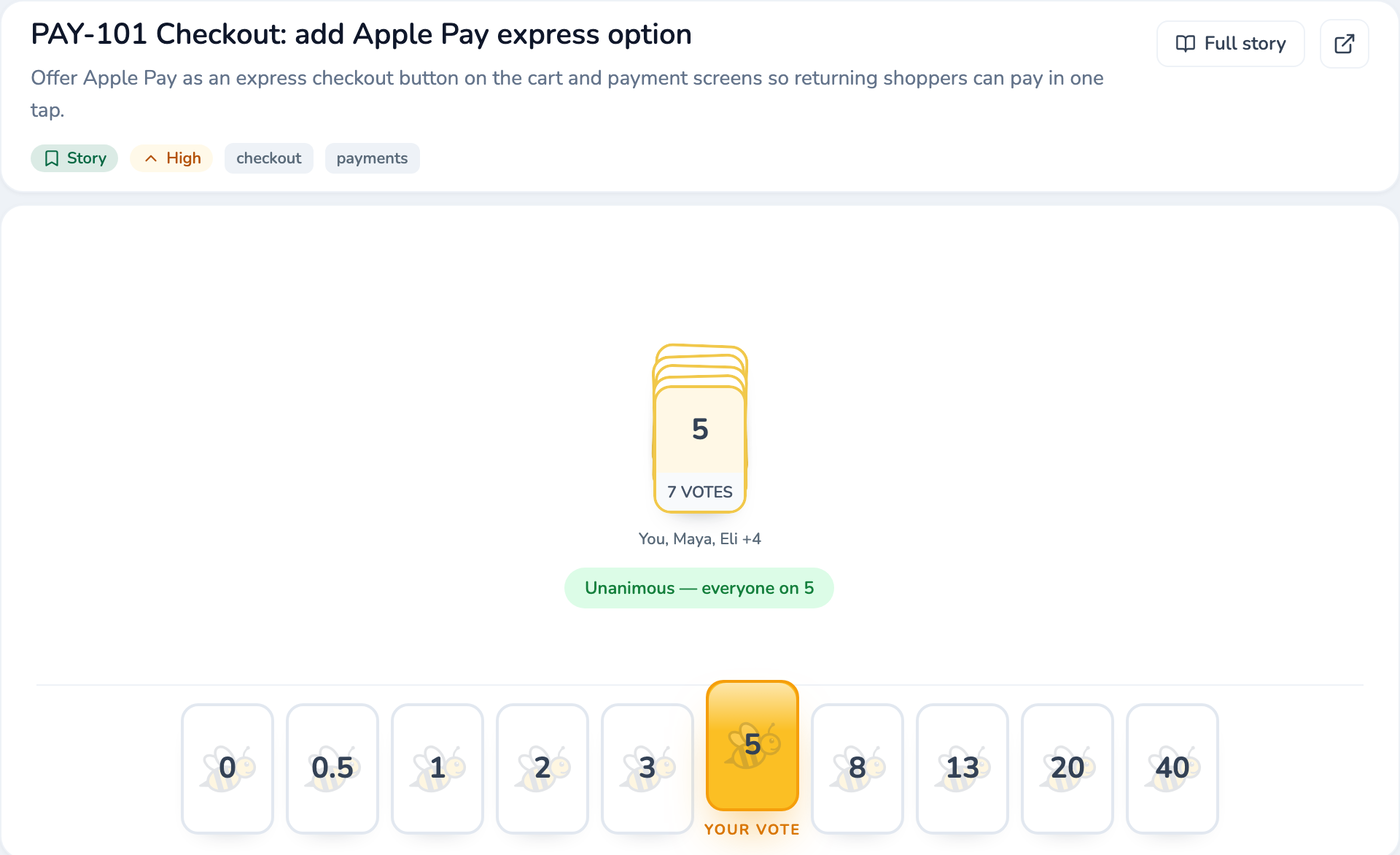
Vote together, reveal at onceEveryone picks a card, the reveal is one click, and a wide spread is flagged so the discussion starts where the estimates split. Accept lands the number.
Split stories without leaving the roomWhen an item is too big to estimate, split it into new items on the spot. The originals, links, and queue stay tidy.
Leave with proof, not vibesEvery session ends with a summary — how aligned the votes were, where the team converged, and how long it took.
Your deck, your scaleFibonacci, T-shirt sizes, or a fully custom deck with whatever values your team argues in — edit and reorder it right in the room, on the Free plan.
Estimate on anyone's scheduleOpen a ballot with a deadline. Teammates vote from any device when it suits them — votes stay hidden until the ballot closes, so nobody anchors.
Meet only where the votes splitConsensus items accept themselves. The divergence review sorts the rest by spread, so the meeting starts with the widest disagreement — and often that's the whole agenda.
Nobody has to remember to voteProWhen a ballot opens, the team gets pinged where they already are — Slack, Teams, or email — with a reminder before it closes.
Bring the backlog inProPull a sprint, cycle, saved search, or GitHub Project into the room — descriptions, status, estimates, and people ride along, so nobody re-reads the work item aloud.
Points return before the meeting endsProAccept an estimate and it is already back on the connected Jira, Linear, or GitHub item — no export step and no copy-paste session afterwards.
Vote from the Jira tab you're already inThe Browser Companion — a free Chrome extension — pairs any Jira tab with your room, so you can read the ticket and cast your vote without switching windows.
The stage mid-session: a revealed round with the range flagged as a split.
Reflect anonymously, vote in secret, commit with an owner — then open the next retro by grading last sprint's actions.
Start from a proven formatStart-Stop-Continue, 4Ls, Sailboat, Starfish — up to five columns — or write your own prompts for the session. Pro Workspaces can save a custom set as their default.
Reflect in private, organize togetherReflections stay hidden while people write — no anchoring. Then the board becomes a shared canvas where related cards group into topics.
AI drafts the grouping — you approve itProOn a full board, ask for a suggested grouping. Review every suggested topic, rename or reject any of them, and apply only what's right — the facilitator stays in charge.
Vote before you discussEveryone gets a limited set of secret votes, so the loudest voice doesn't set the agenda — the discussion starts with what the team actually cares about.
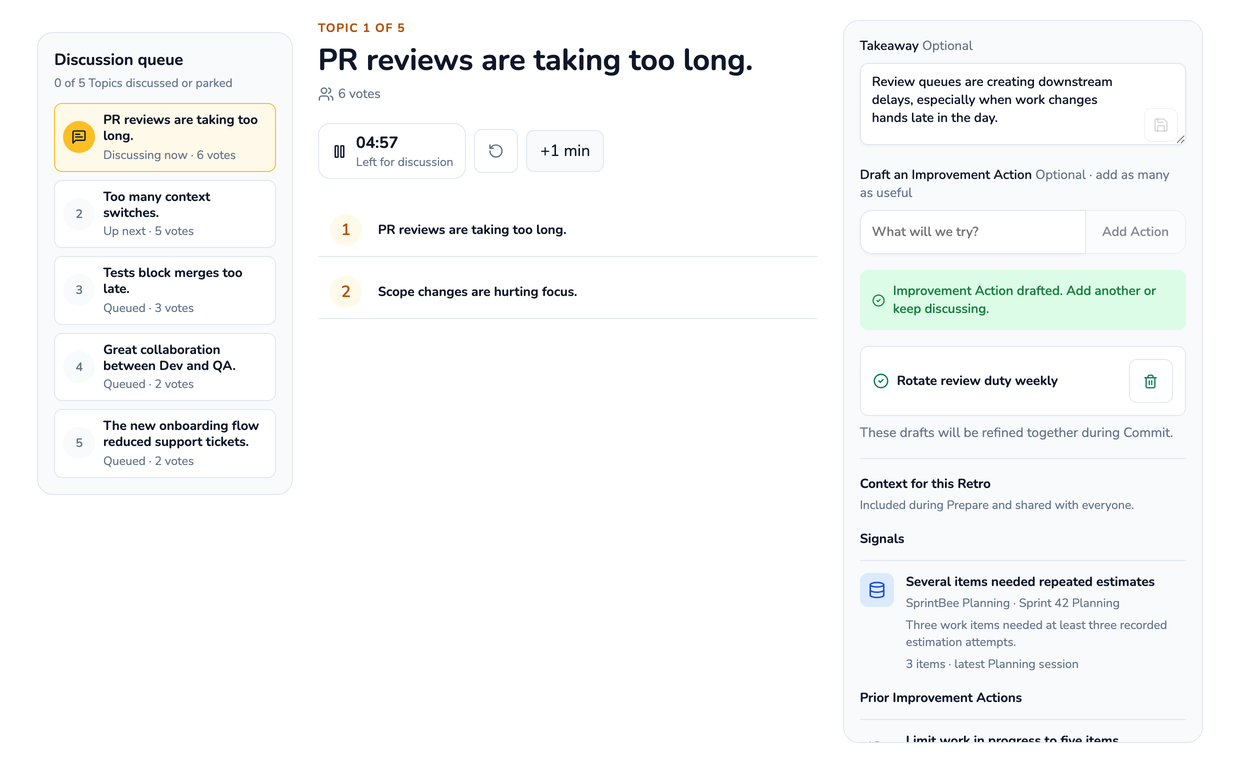
Every topic leaves with an ownerActions get an owner and a success cue — the observable change that tells you it worked, not just "we'll try harder."
Grade last retro's actionsThe next retro opens by reviewing what you committed to: Helped, No clear effect, Did not help, or Keep observing. Honest, on the record, and nobody else does it.
Actions land in your trackerProFile actions straight into Jira or Linear as real issues — with the owner and success cue attached — so retro commitments live where the work lives.
Signals ground the conversationProFacts from your team's own history — wide estimation disagreement, items that needed repeated attempts, actions due for review — plus delivery data when your tracker is connected. Topics start with evidence instead of memory.
Open with the iteration's actual storyProPick the sprint, cycle, or GitHub iteration that frames the retro — its dates set the period, last retro's actions arrive due for review, and the evidence Signals line up beside them.
The template picker: proven formats, or your own prompts.
A Free plan you can count on. Pay per Workspace, not per person.
Free stays available for a single Workspace, including its Planning Room and Retro Room. Pro adds integrations, notifications, retro analysis, and access controls — priced per Workspace, so you pay for exactly as many teams as you bring.